wikipedia
JOSM plugin snapshot update site
Here is how you can install the current development version (not yet released, expect issues) of the wikipedia and the pt_assistant JOSM plugins:
- Open any JOSM instance in which you want to try out these development versions.
- Go to the preferences (e.g. hit
F12). - Make sure the checkbox
Expert modein the bottom left corner of the preferences dialog is checked. - Go to the
Pluginstab. Click onConfigure…in the bottom right corner.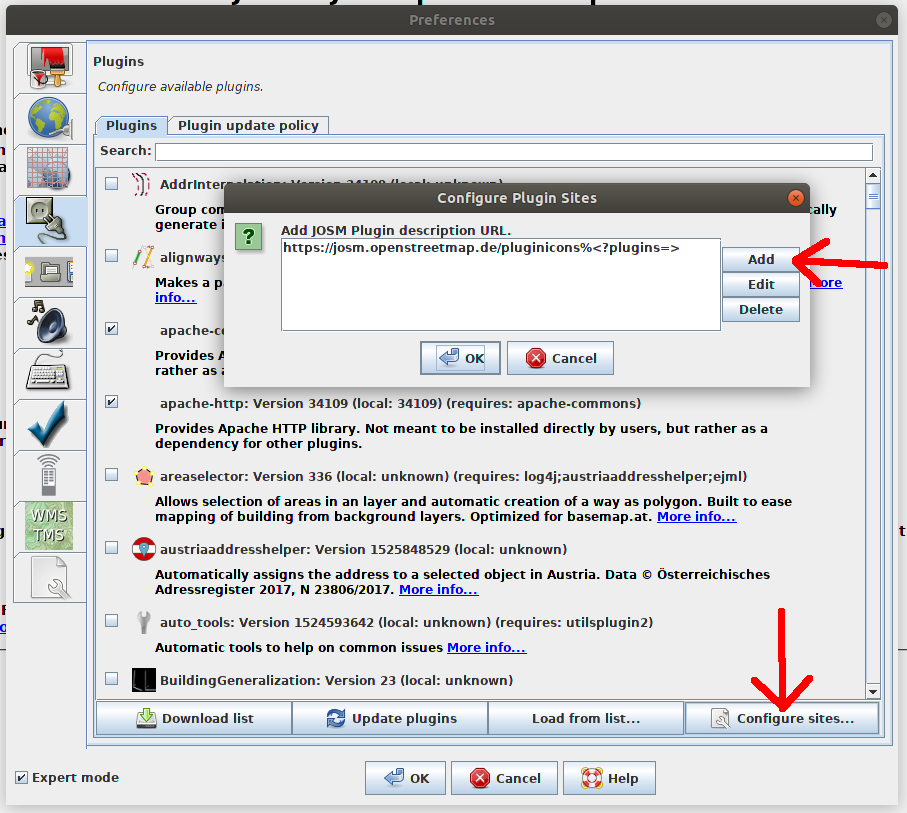
- Then click on
Addin the new dialog and enter the URL https://josm.github.io/wikipedia/pluginMasterSnapshots and confirm withOK. - Now when you click
Download list, you have two new plugins in the plugin list:wikipedia-devandpt_assistant-dev. You can install these and they are updated like the “normal” JOSM plugins too.
Note: Please make sure that you don’t have both the dev and the non-dev version (e.g.
wikipediaandwikipedia-dev) installed at the same time! This would probably lead to conflicts.
Another note: The
pt_assistant-devplugin will always be redownloaded whenever you check for plugin updates. Thewikipedia-devplugin is only redownloaded when there is actually a new version available on the master branch.